
Weekly grid
Meals per day, week by week
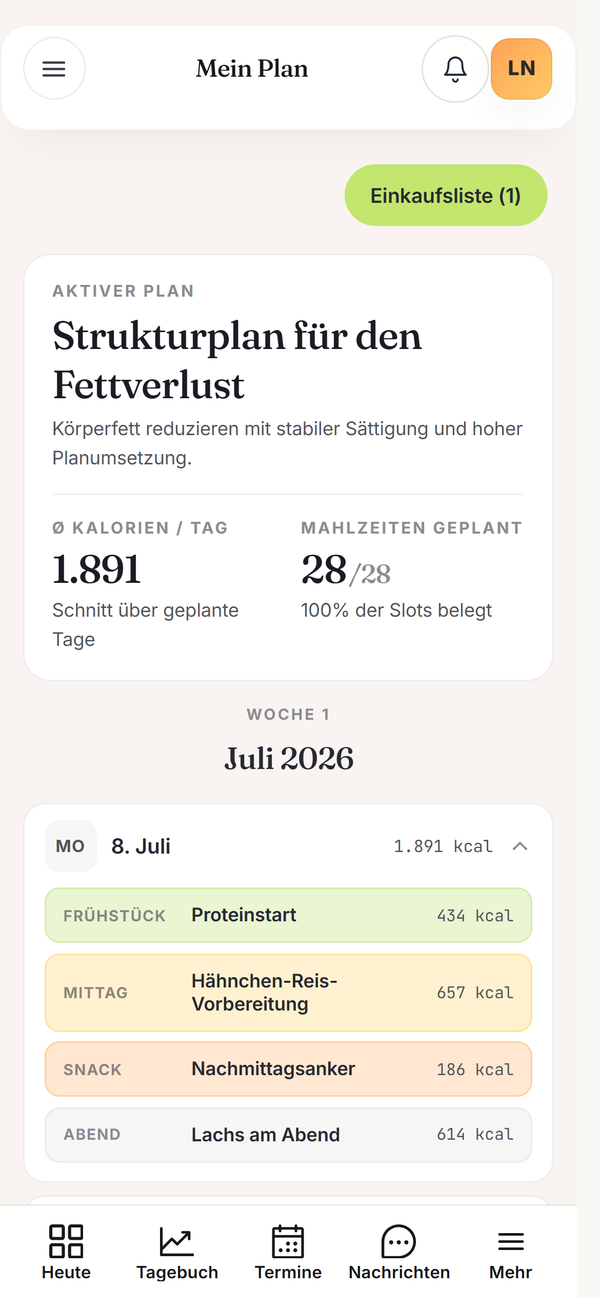
Breakfast, lunch, snack and dinner for each day, over several weeks if needed. Every tile shows calories and macros, and you fill empty cells with a click.
Feature in detail
Weekly plans that do the maths: nutrition values from the BLS (German Nutrient Database), the target from the needs assessment, the shopping list from the plan. Clients see their week in the portal, you keep control of versions and release.
In the portal
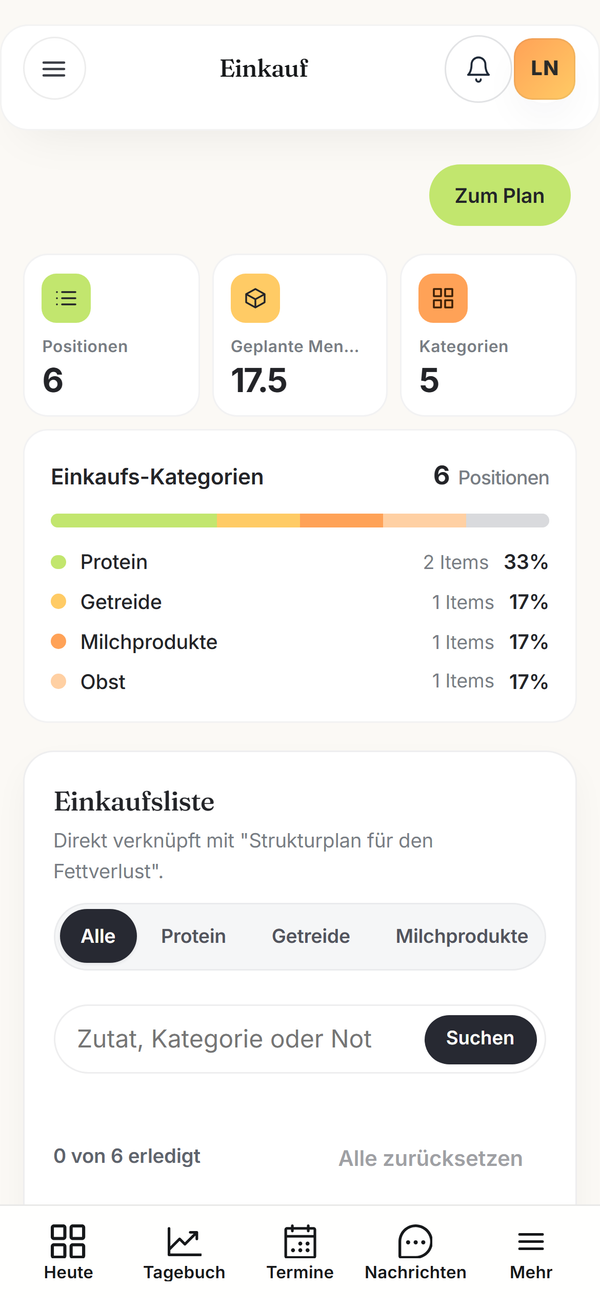
Clients open their plan in the portal: days as columns, meals as rows, calories per day at the top. They tick off the matching shopping list in the shop.
The building blocks
Weekly grid
Breakfast, lunch, snack and dinner for each day, over several weeks if needed. Every tile shows calories and macros, and you fill empty cells with a click.
Nutrition values
Foods come from the BLS (German Nutrient Database) and from Open Food Facts for branded products. Recipes bring their per-portion values with them. nutriam calculates calories and macros, not you.
Weekly balance
The daily target from the needs assessment sits above the plan. The weekly balance shows daily totals, the weekly average and the difference from the target, live while you edit.
Recipe library
You add the nutriam library to your practice with one click and adjust ingredients and portions. You create your own recipes alongside it with the ingredient editor.
Shopping list
The shopping list is generated from the plan: recipes are broken down into ingredients and scaled to the planned portions, and identical ingredients are combined. Clients see it in the portal sorted by category and tick items off in the shop.
Safety
Allergies and medical notes from the intake appear right on the plan. Drafts and released versions are kept. Clients only see what you publish.
How it works in practice
The energy target and macro profile come from the needs assessment into the plan. If it's still missing, one click takes you there.
A recipe from the library or your practice, a food from the database or free text: tile by tile, with save and continue to the next open slot.
The weekly balance shows whether days are too lean or too generous. If it fits, you publish the plan. Clients see it in the portal right away.
Generate the shopping list, download the plan as a PDF in your practice branding or let clients download it themselves: for the fridge, not just the phone.
Frequently asked questions
From the BLS (German Nutrient Database) and, for branded products, from Open Food Facts. Recipes bring their per-portion nutrition values with them. Pure free-text items carry no values, and the plan says so on the tile.
The nutriam library contains 200 curated recipes with BLS nutrition values, identical for all practices. On top of that come your own recipes, which you create with ingredients from the BLS or Open Food Facts.
No. A plan only becomes visible in the portal once you publish it. Drafts and earlier releases are kept as dated versions.
You save a proven plan as a template without a client and create a draft from it for each new client, or you duplicate a plan directly. Recipes from the library and your own recipes are available practice-wide in every plan.
Yes. You download any plan as a PDF in your practice's branding, and clients can do the same in the portal. The PDF contains all weeks with meals, quantities, notes and, where available, nutrition values per meal and day.
Further reading: the client file and needs assessment page explains where the daily target comes from. The food tracking page shows how clients put the plan into practice day to day.
More features
Start for free and build your first weekly plan with the recipe library: 14-day trial, no credit card.